
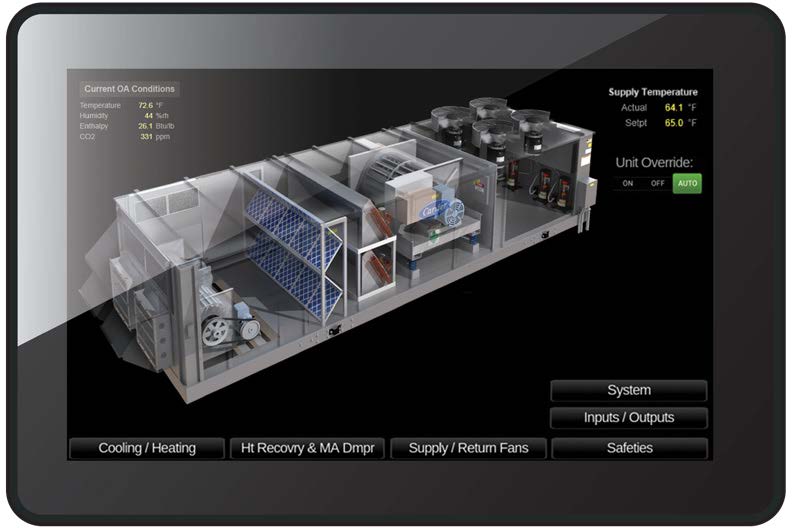
The Automated Logic OptiPoint System Touch (SYST) is a graphical touchscreen interface that provides building operators and HVAC technicians with visibility and control over connected building automation equipment. Connecting to multiple WebCTRL controllers through BACnet MS/TP, the SYST offers an intuitive way to monitor and manage building systems from a single interface.
Featuring a 5-inch, high-resolution capacitive multi-touch display with 800 × 480 resolution, the OptiPoint System Touch provides access to controller points, alarms, trends, time schedules, and setpoints. Its interface supports pinch-to-zoom and swipe navigation for trend viewing, along with conditional alarms and colour changes to highlight important information.
Designed for convenient operation and installation, the SYST features a fanless cooling system, low power consumption, wall or panel mounting, and support for 13 international languages and characters. Multi-level password protection helps secure access, while the built-in temperature and humidity sensors provide additional environmental information.
Programming is simplified through the ViewBuilder WYSIWYG editor, which includes a library of interactive controls and supports standard Equipment and System Touch files. Additional capabilities include graphics support, a built-in PDF viewer, USB-C connectivity for firmware updates, and screen capture to a USB flash drive.
The OptiPoint System Touch provides a practical graphical interface for managing HVAC equipment and accessing building automation information through the WebCTRL system.
Key Features & Benefits
Features:
- - 5-inch capacitive multi-touch touchscreen
- - 800 × 480 pixel Wide VGA resolution
- - 24-bit colour display
- - Connects to multiple controllers via BACnet MS/TP
- - EIA-485 serial communication port
- - Ultra-wide viewing angle of nearly 180 degrees
- - Supports 13 international languages and characters
- - Conditional alarming and colour changes
- - View controller points, alarms, and trends
- - Pinch-to-zoom and swipe navigation for trends
- - View and edit BACnet time schedules
- - Adjust equipment setpoints
- - Multi-level password protection
- - Built-in temperature and humidity sensors
- - Fanless cooling system and ultra-low power consumption
- - Programmable through the ViewBuilder WYSIWYG editor
- - Supports standard Equipment and System Touch files
- - Graphics support and interactive control library
- - USB-C port for firmware upgrades
- - Screen capture to USB flash drive
- - Built-in PDF viewer
- - Wall or panel mounting for interior installations
- - Real-time clock and calendar with at least three days of timekeeping during power failure
- - Operating temperature: 32°F to 104°F (0°C to 40°C)
- - Operating humidity: 10–90% relative humidity, non-condensing
- - Power: 24 Vac (±15%), 5 VA, or 12–24 Vdc
Benefits:
- - Provides a centralized graphical interface for connected HVAC equipment.
- - Simplifies access to controller points, alarms, trends, schedules, and setpoints.
- - Helps operators identify important conditions through conditional alarms and colour changes.
- - Makes trend data easier to navigate with pinch-to-zoom and swipe gestures.
- - Supports secure access through multi-level password protection.
- - Accommodates a broad range of users with support for 13 international languages and characters.
- - Offers flexible installation with wall or panel mounting.
- - Reduces cooling requirements and power consumption through fanless, low-power operation.
- - Simplifies interface programming using the ViewBuilder WYSIWYG editor and interactive control library.
- - Supports local firmware updates through USB-C.
- - Provides convenient access to PDF documents and screen captures directly from the device.
- - Adds temperature and humidity monitoring capabilities through built-in sensors.
- - Helps building operators monitor and manage building operations through the WebCTRL building automation system.